Back to projects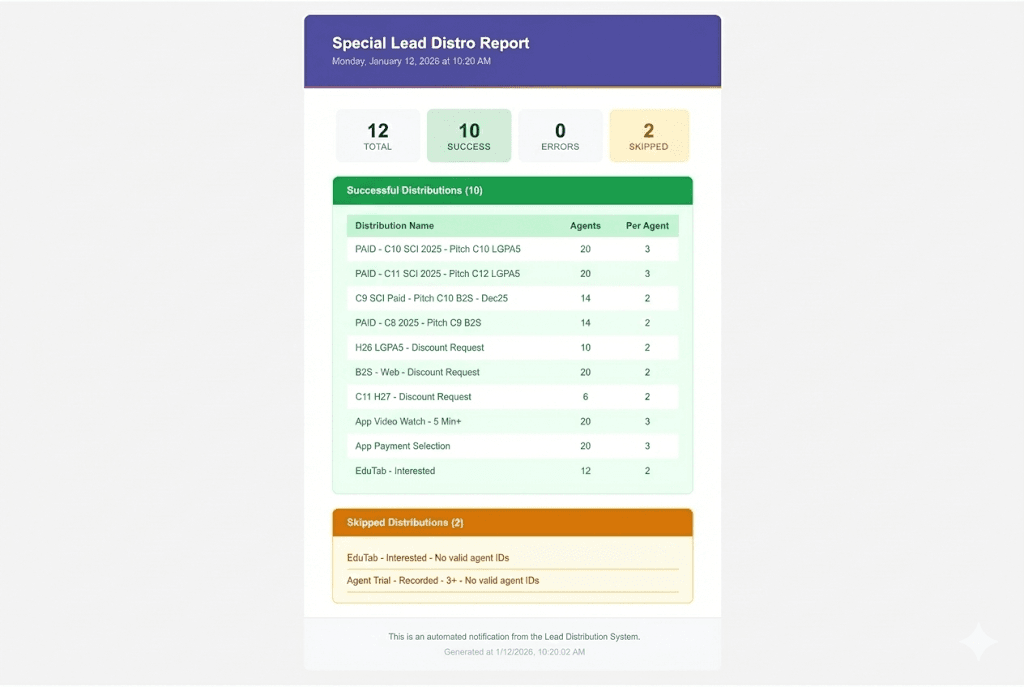
CRM API Integration
Lead Distribution Automation
A fully automated lead distribution system using Google Apps Script that connects directly to CRM API. Runs on a daily schedule with zero manual intervention.
Click to view all 2 screens
The Challenge
A sales operations team was spending 2+ hours daily on manual lead distribution. Every morning, a team member had to:
- Open the CRM system and navigate to filters
- Copy agent IDs from a planning spreadsheet
- Manually trigger bulk distributions one by one
- Track which distributions succeeded or failed
- Report results to stakeholders via email
How It Works
- Every morning, the script automatically finds today's distribution plan (e.g., 'Special Leads - 15-Jan-2026')
- Extracts distribution configurations: filter names, agent/group IDs, leads per agent
- Fetches filter details from the CRM API and builds the required query parameters
- Executes bulk lead distributions via REST API calls
- Logs success/failure status for each distribution row
- Sends a professional HTML email report to stakeholders
Technical Highlights
- Self-renewing triggers: Triggers automatically reschedule for the next day after each run
- Dual distribution modes: Supports both agent-specific and group-based distributions
- Dynamic API integration: Fetches filter configurations and constructs query strings dynamically
- Smart sheet detection: Auto-detects today's sheet by parsing date patterns from sheet names
- Comprehensive error handling: Captures API errors, missing filters, and invalid data with detailed logging
- Professional email reports: Color-coded HTML emails with status indicators
Tech Stack
Google Apps ScriptREST APIGoogle SheetsHTML Email TemplatesUrlFetchAppTime-based Triggers
Results
- 2+ hours daily → 0 minutes (fully automated)
- Eliminated manual copy-paste mistakes
- Leads distributed before the workday begins
- Stakeholders receive automated reports with full audit trail
- Handles unlimited distribution rows without additional effort
Screenshots
Click to expand
1 / 2
Need something similar?
Let's discuss how I can help automate your workflows.
